
Understanding SSD vs HDD: Why It Affects Your Computer’s Speed
Comprehensive Analysis of SSD versus HDD: Impact on Computer Performance and Speed Optimization
In the domain of digital data storage, two predominant technologies have established themselves as the primary solutions for retaining and accessing information: Hard Disk Drives (HDDs) and Solid-State Drives (SSDs). Both mediums fundamentally serve the essential function of data storage; however, they diverge considerably in their underlying technology architectures, operational efficiency, performance metrics, and optimal application environments. This extensive overview delves into the technological distinctions, various form factors, classifications of SSDs based on memory cell architecture, a detailed comparative framework, practical guidance for end users, and strategic considerations for migrating from HDDs to SSD-based systems.
Technological Framework: Contrasting HDDs and SSDs
Hard Disk Drives (HDDs)
HDDs have been integral to computer storage infrastructure for several decades, characterized by their reliance on electromechanical systems. These drives operate by spinning magnetic platters coated with ferromagnetic materials to represent data bits. Precision-driven actuator arms, equipped with read/write heads, navigate the disk’s concentric tracks to execute data retrieval and writing. Core attributes of HDDs encompass:
– Storage Capacities: HDDs traditionally provide substantial storage volume options at a comparatively lower cost-per-gigabyte ratio, making them economically advantageous for large-scale data retention requirements.
– Data Transfer Rate and Latency: Owing to their mechanical nature, HDDs exhibit relatively slower data throughput speeds and increased latency, constrained by physical disk rotation speeds and seek times.
– Mechanical Vulnerability: The presence of moving components such as spinning platters and actuator arms introduces susceptibility to wear, mechanical failure, and physical shock-induced damage, which can jeopardize data integrity.
Solid-State Drives (SSDs)
Conversely, SSDs embody progressive advancements in semiconductor technology by employing non-volatile NAND flash memory chips for data storage, resulting in dramatically enhanced I/O performance metrics. Due to the absence of mechanical motions, SSDs offer superior operational characteristics, reflected in the following key features:
– Accelerated Performance: SSDs deliver significantly faster boot sequences, expedited file transfer operations, and minimized latency during application loading phases, thereby contributing to a smoother and more responsive user experience.
– Enhanced Durability: The elimination of moving parts inherently increases SSD robustness, reducing susceptibility to physical shocks, vibrations, and mechanical failures, which amplifies overall data reliability and device longevity.
– Optimized Energy Consumption: SSDs typically require less electrical power compared to HDDs, positioning them as an ideal storage solution for mobile platforms and ultra books where energy efficiency and extended battery runtimes are priorities.
Form Factor Variability for Diverse Applications
The storage industry offers HDDs and SSDs across multiple standardized and specialized form factors to accommodate distinct device architectures, thermal management considerations, and performance demands:
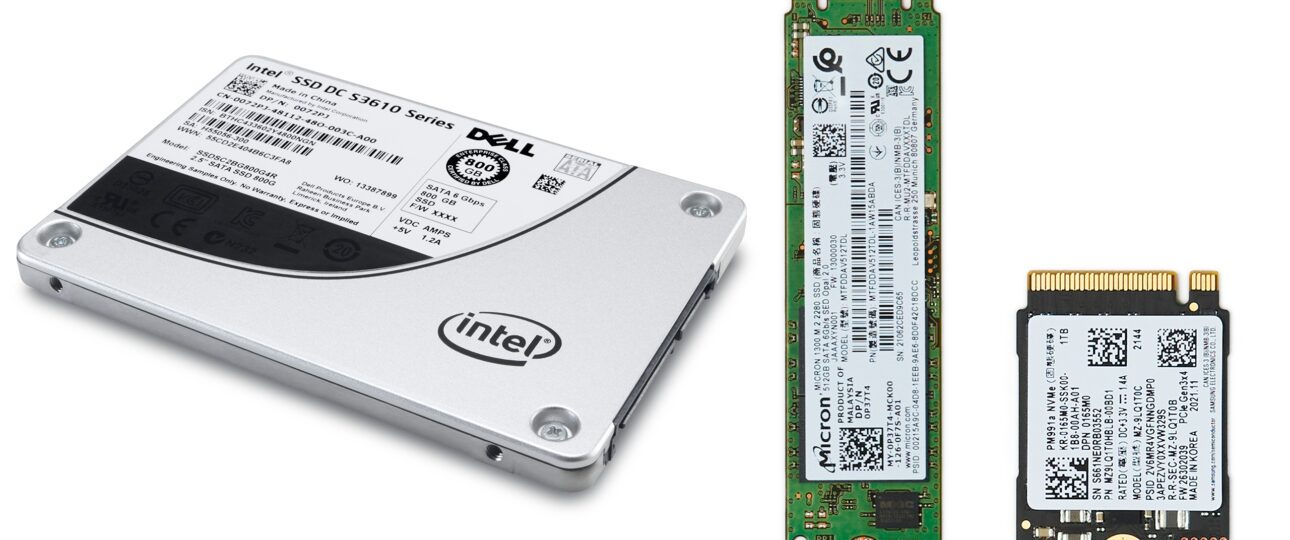
– 3.5-inch SATA Drives: Predominantly utilized in desktop environments, these drives feature larger physical dimensions, straightforward installation protocols, and broad compatibility across legacy hardware platforms.
– 2.5-inch SATA Drives: Frequently integrated within laptop systems and compact desktops, these drives balance size constraints with compatibility and installation convenience.
– M.2 SSDs: A compact, high-speed form factor directly interfacing with motherboard sockets, designed to optimize data throughput while minimizing physical footprint, increasingly favored for modern computing devices.
– PCIe (Peripheral Component Interconnect Express) SSDs: These drives connect via specialized PCIe slots, providing ultra-high-bandwidth data transfer capabilities suited for demanding workloads such as gaming, content creation, and enterprise applications requiring rapid data access.
Taxonomy of SSDs Based on NAND Flash Memory Cells
Solid-State Drives vary based on the type of NAND flash memory cells they incorporate, each offering distinct trade-offs in terms of speed, endurance, storage density, and cost-efficiency:
– Single-Level Cell (SLC): Represents the highest tier in performance and data retention reliability, storing one bit per cell. However, this technology entails elevated production costs, limiting its deployment primarily to enterprise-grade and mission-critical systems.
– Multi-Level Cell (MLC): Balances performance and endurance with cost, accommodating two bits per cell. This mid-tier technology suits professional environments requiring a compromise between speed and storage capacity.
– Triple-Level Cell (TLC): Increases storage density by storing three bits per cell at a reduced manufacturing expense, though this comes with moderately decreased write endurance and slower access speeds compared to SLC and MLC.
– Quad-Level Cell (QLC): Maximizes storage capacity while minimizing costs by encoding four bits per cell, but exhibits lower durability and slower performance parameters, making it optimal for archival or read-heavy applications rather than intensive write tasks.
Best Practices for Sustaining Drive Reliability and Optimized Performance
To preserve storage device longevity and maintain peak operational efficiency, users are advised to adopt the following system maintenance and management protocols:
– System Updates: Ensure the operating system kernel and peripheral driver software remain current to support the latest hardware enhancements and security patches.
– Application and File Management: Periodically uninstall redundant software and organize data repositories to streamline system resource allocation.
– Disk Cleanup and Optimization: Employ specialized utilities to excise superfluous files, temporary data, and caches, thus liberating storage capacity and reducing system overhead.
– Activation of TRIM Command for SSDs: Enable this critical command to facilitate effective garbage collection, which helps sustain consistent write performance and prolong SSD lifespan by preventing performance degradation over time.
Indicators Signaling the Necessity for Storage Upgrade
Modernizing existing storage infrastructure can substantially augment computational throughput and user responsiveness. Key signals for considering an upgrade include:
– Prolonged System Boot Duration: Excessively long startup sequences suggest storage bottlenecks, warranting migration to faster SSD technology.
– Application Response Latency: Noticeable delays when launching or switching between software applications frequently indicate HDDs operating beyond optimal performance thresholds.
– Storage Capacity Saturation: Continual warnings regarding insufficient disk space or inability to accommodate growing data workloads imply the need to transition to higher-capacity drives or SSD solutions.
Stepwise Methodology for Transitioning from HDD to SSD
The procedural transformation from traditional HDDs to advanced SSDs encompasses multiple structured phases to safeguard data integrity and ensure system compatibility:
– Comprehensive Data Backup: Prioritize the secure archiving of critical documents, multimedia assets, and configurations before initiating hardware modifications.
– SSD Selection Criteria: Identify SSD models compatible with the target computer system’s hardware interface standards and firmware constraints to assure seamless integration.
– Physical Installation: Carefully remove the existing HDD and install the SSD in its place, adhering to manufacturer service manuals and best-practice installation guidelines.
– Operating System Deployment: Reinstall the operating system utilizing USB installation media or pre-configured recovery solutions to establish a clean and efficient software environment.
– Data Restoration: Migrate the previously backed-up datasets and settings onto the new SSD to reconstitute the user’s personalized workspace.
By adhering to these comprehensive guidelines, users can effectively leverage the superior performance attributes of SSDs over conventional HDDs, thereby optimizing computational efficiency, enhancing system responsiveness, and extending device longevity in alignment with contemporary market expectations and technological advancements.
📞 Phone / Call +256700393395 or WhatsApp +256700393395
🌍 Available in: Kampala Uganda