
7 Signs Your Computer Needs Maintenance Before It Crashes
7 Warning Signs Your Computer Needs Maintenance Before Disaster Strikes
Your computer isn’t just a piece of tech—it’s your communication hub, your productivity engine, your entertainment centre, and your digital archive all rolled into one. So when it starts acting up, it’s tempting to brush it off or hope it’ll magically fix itself. I’ve seen countless folks wait until their machine crashes catastrophically before seeking help—and trust me, by then, the fix is costlier and more stressful.
Drawing from years of experience helping users and diagnosing hundreds of devices, I want to share seven telltale signs your computer is waving a red flag. Spotting these early can save your data, your wallet, and your sanity.
1. Your Computer Feels Like It’s Moving Through Molasses
Slowness is the #1 complaint I hear. Sure, every computer can lag now and then, but if opening a simple webpage or launching Word suddenly feels like a chore, it’s time to pause.
Why does your machine slow down?
– Too many programs running behind the scenes
– Malware or spyware stealthily consuming resources
– Your hard drive almost full or corrupt sectors lurking
– Outdated hardware like low RAM or an aging CPU
– A hard drive on its last legs, especially in older systems
Why care? Sluggishness isn’t just annoying; it’s a red flag that things beneath the surface might be failing. Ignore it, and you risk crashes or worse.
Pro Tip: Pop open Task Manager (Ctrl + Shift + Esc) and check what’s hogging memory or disk space. If something looks fishy, get a professional opinion before you end up with a dead computer.
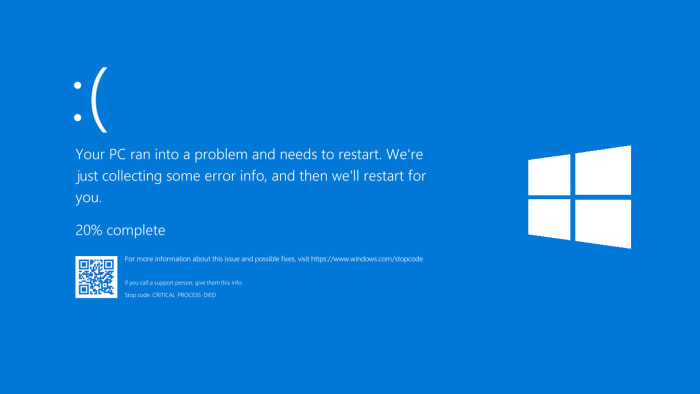
2. The Infamous Blue Screen of Death (BSOD) Makes an Appearance
That cold blue screen isn’t just a system hiccup—it’s your OS waving a white flag because it hit a critical snag it can’t fix.
Triggers include:
– Driver conflicts or outdated software drivers
– Hardware failures like wonky RAM
– Corrupted system files
– Malware infections
– Overheating parts
Why it’s a big deal? Frequent BSODs usually mean instability. Repeated crashes can damage components or cause data loss.
Pro Tip: Don’t just close out the blue screen; snap a photo or save the error code. This can be a lifesaver for your repair technician to pinpoint the trouble.
3. Sneaky Viruses or Malware Might Have Invaded
Viruses today aren’t the flashing, popup-spamming nuisances of old. These sneaky critters silently steal data, watch your every move, or even use your PC for shady activities.
Symptoms to watch for:
– Random pop-ups or odd ads
– Programs launching on their own
– High CPU usage and overheating
– Antivirus software suddenly disabled
– Your browser redirecting to weird websites
Why it scares me: Beyond slowing things down, malware risks your identity, finances, and private info.
Pro Tip: If your antivirus refuses to run or is mysteriously disabled, call in a pro. Sometimes, manual removal is the only way to clear out every last threat.
4. Your Computer Is Overheating Like It’s Summer in the Sahara
Computers are tough, but overheating is a serious headache. If the fan sounds like a jet engine or the laptop feels hot even when you’re just browsing, that’s a warning.
Why does this happen?
– Dust gunking up fans and vents
– Broken or inefficient cooling systems
– Old or dried-out thermal paste on your CPU
– Blocked airflow from poor laptop placement (think beds or couches)
– Background apps pushing the hardware hard
Why should you care? Overheating can wreck your motherboard, graphics card, or processor—expensive components to replace.
Pro Tip: If your device’s heating up, shut it off and let it cool. A professional cleaning or fan replacement can work wonders.
5. Apps Freeze or Crash Randomly, Making You Want to Throw Your Computer Out the Window
We all get a random freeze now and then, but frequent crashes while surfing or working are a cry for help.
Possible causes:
– Conflicting software
– Corrupted app files
– Not enough memory or disk space
– Malware lurking unseen
– Out-of-date or incompatible drivers
Why it’s a problem? It kills productivity and can corrupt your files, especially if your system freezes during a save.
Pro Tip: Keep a note of which apps crash and when. Patterns help technicians zero in on root causes.
6. Weird Sounds Like Clicking, Grinding, or Buzzing Coming From Your Machine
Your PC shouldn’t sound like a blender or a busy factory. Strange noises usually mean hardware is struggling.
Common culprits:
– Failing hard drives making clicking or ticking sounds
– Overworked or faulty fans buzzing or spinning loudly
– Loose internal parts rattling around
– Optical drives behaving oddly trying to read empty disks
– Coil whining from GPUs or power supplies
Why this matters: Clicking noises from a hard drive are ominous—data loss usually follows.
Pro Tip: If you hear odd sounds, back everything up NOW. Record the noises if you can and bring it to your technician—it’s invaluable for diagnosis.
7. Boot-Up and Shutdown Struggles Slow You Down
Your computer should start and stop without drama. If you’re stuck on a loading screen, stuck in a reboot loop, or the shutdown process hangs, there’s trouble brewing.
Common causes:
– Software corruption or buggy updates
– Failing startup applications or essential system services
– Malware interfering
– Hardware issues like a dying power supply or motherboard
What to watch for:
– Freezing on the logo screen
– Unexpected restarts
– Startup error messages
– System hangs during shutdown
Pro Tip: Don’t ignore these delays. They’re often precursors to hardware failure. A health check by a pro can uncover hidden problems.
When to Call in the Experts—Yesterday
If you notice several of these signs, especially BSODs, suspicious viruses, or weird noises, stop tinkering on your own and let a professional step in.
What they’ll do:
– Run comprehensive diagnostics
– Hunt down and eliminate malware
– Repair or replace faulty hardware
– Backup and recover your precious data
– Reinstall or repair your operating system
– Provide preventive maintenance to keep things smooth
Don’t wait for catastrophe—the sooner you act, the better your chances of saving your system and your data.
Final Thoughts: Don’t Let Small Glitches Turn Into Big Headaches
Your computer is constantly talking to you through symptoms. Recognizing these early warning signs can save you from a nightmarish crash, save money, and protect your irreplaceable files. Slow speeds, blue screens, viruses, overheating, strange noises—they all tell a story. Usually, that story ends with needing professional help.
The bottom line? Trust those red flags. The earlier you call in a technician, the higher the chance of restoring your system’s health without losing performance or critical information. Notice any of these warning signs? Think of them as urgent messages, not minor annoyances. Reach out to your trusted computer repair expert and schedule a thorough checkup before a small problem balloons into disaster.
📞 Phone / Call +256700393395 or WhatsApp +256700393395
🌍 Available in: Kampala Uganda